Encrypted remote access protects traffic between your device and a remote machine so that nobody on the networks in between can read or alter it. It works in three steps: the two ends prove who they are with public-key cryptography, they agree on fresh session keys in a handshake, and they encrypt every packet with those keys using an authenticated cipher. The detail that decides how private it really is: where the traffic gets decrypted.
The building blocks
Key pairs
Each endpoint has a key pair: a private key that stays secret and a public key that can be shared. Something encrypted to, or signed by, a key pair can only be produced or read by whoever holds the private half. Identity in encrypted remote access usually means "holds the private key matching this public key."
The handshake
Two endpoints can't just use their long-term keys to encrypt everything; they derive session keys for each conversation. A key exchange such as (Elliptic-Curve) Diffie–Hellman lets both sides compute the same secret without sending it. Mixing in fresh, random ephemeral keys for each session gives forward secrecy: stealing a device's long-term key later doesn't decrypt sessions recorded earlier.
Mixing in the long-term keys as well authenticates the handshake: only the holder of the expected private key can derive the same session keys. The Noise Protocol Framework describes common patterns for doing this; TLS 1.3 (RFC 8446) is the most widely deployed handshake on the web.
Authenticated encryption
Packets are then protected with an AEAD cipher (authenticated encryption with associated data) such as AES-GCM or ChaCha20-Poly1305. AEAD gives two guarantees at once: an eavesdropper can't read the packet, and a tampered packet fails verification and is dropped. A per-packet counter used as the nonce, plus a window of recently seen counters, lets the receiver reject replayed packets.
End-to-end vs hop-by-hop
This is the question to ask of any remote-access setup.
Hop-by-hop: traffic is encrypted from your laptop to a gateway, decrypted there, and sent on (re-encrypted or not) to the server. The gateway can see everything that passes through it. That's how classic VPN concentrators and TLS-terminating proxies work. It can be a deliberate choice, for example to inspect traffic, but it means trusting that box with your data.
End-to-end: traffic is encrypted on your laptop and only decrypted on the server. Anything in the middle (routers, your ISP, a relay) forwards ciphertext. Even a component operated by your VPN provider can't read it, provided it never has the session keys.
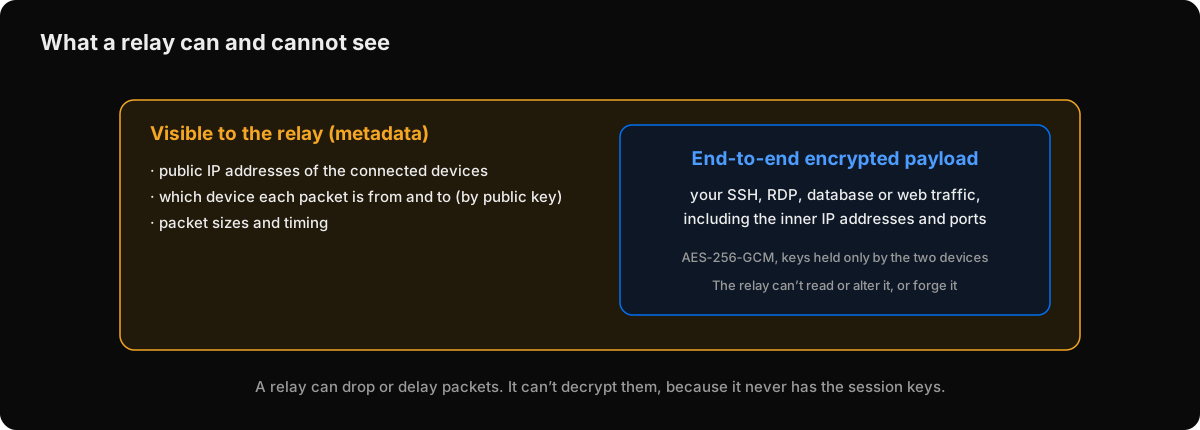 With end-to-end encryption, a relay sees metadata but not content.
End-to-end encryption doesn't hide everything. Whoever forwards the packets still sees metadata: which addresses are talking, when, and how much. And it doesn't protect you from the endpoints themselves; if a laptop is compromised, so is what it can reach.
Who decides which keys to trust?
Encryption is only as good as the answer to "is this really the server's public key?". SSH asks you on first connection (trust on first use). TLS relies on certificate authorities. Mesh VPNs rely on a coordination service that tells each device which public keys belong to the network. That service is part of what you trust: if it were compromised, it could introduce a device that your other devices would accept. Knowing where that trust anchor sits is part of evaluating any remote-access tool.
How Peerlify encrypts traffic
Peerlify uses end-to-end encryption between every pair of devices:
- Device keys. On first start, each device creates two key pairs: an Ed25519 key that proves its identity to Peerlify's control plane, and a P-256 key for sessions with other devices. Only the public keys leave the device.
- Handshake. Two devices exchange fresh ephemeral P-256 keys and combine them with their static keys in four Diffie–Hellman operations, then derive session keys with HKDF-SHA256. It follows the Noise IK pattern, but it is Peerlify's own construction, not an implementation of the Noise Protocol Framework.
- Packets. AES-256-GCM with a separate key per direction. Each packet carries a counter; repeated or very old counters are rejected.
- Source check. The receiving device verifies that a packet's source address belongs to the device whose session decrypted it, so one device can't impersonate another.
- Relays forward the encrypted packets when there's no direct path. They see public IP addresses, device public keys, who talks to whom, and packet sizes and timing; they can't read, alter or forge traffic. The TLS wrapping on relay connections is there to get through firewalls, not for security.
- Trust anchor. The control plane tells devices which public keys belong to the network, and signs full peer-list snapshots. It never receives private keys, session keys or your traffic.
There is no scheduled re-keying: new sessions are set up when a device restarts or a peer's key changes. The full details, including trust boundaries, are in Peerlify's security model.
Checklist for evaluating encrypted remote access
- Where is traffic decrypted: only at the endpoints, or somewhere in between?
- Where are private keys created and stored? Do they ever leave the device?
- What does each intermediate component (gateway, relay, coordination service) see?
- Who decides which keys are trusted, and how is that protected?
- How quickly does access stop when a device or person is removed?
For how these pieces fit into day-to-day server access, see how to securely access a remote server.