NAT traversal is the set of techniques that let two devices, each behind its own NAT router, exchange packets directly even though neither can accept an unsolicited connection from the internet. The usual recipe: each device learns its public address with STUN, the two swap addresses through a channel they can both reach, and both send UDP packets toward each other at the same time (hole punching). When that can't work, traffic goes through a relay.
This article explains each piece, why it sometimes fails, and how Peerlify uses them.
Why NAT gets in the way
A NAT router rewrites the source address of outgoing packets from a private address (say 192.168.1.20:41641) to its own public address and a port it picks (198.51.100.7:62000). It remembers that mapping so replies to 198.51.100.7:62000 can be sent back to the right device.
The catch is in the other direction. A packet that arrives at 198.51.100.7 without a matching mapping has nowhere to go, so the router drops it. That's why you can browse the web from behind NAT but can't run a reachable server without a port forward, and why two devices that are both behind NAT can't simply connect to each other. What is CGNAT? covers the case where your provider adds a second NAT on top.
How NATs differ
RFC 4787 describes NAT behaviour along two axes that decide whether traversal can work:
- Mapping behaviour. With endpoint-independent mapping, the router reuses the same public port for a given private address and port, whatever the destination. With endpoint-dependent mapping (often called symmetric NAT), each new destination gets a different public port.
- Filtering behaviour. Which inbound packets the router accepts on an existing mapping: from anyone, only from addresses the device has sent to, or only from exact address-and-port pairs it has sent to.
Hole punching relies on endpoint-independent mapping: the public port a device learns from one server has to be the same port its peer will see.
Step 1: learn your public address with STUN
STUN (RFC 8489) is a simple request/response protocol. A device sends a Binding request over UDP to a STUN server, usually on port 3478, and the server replies with the source address and port it saw. That is the device's server-reflexive address: its public ip:port as the outside world sees it.
Step 2: gather and exchange candidates
A device can be reachable at several addresses, called candidates:
- a LAN address, if the peer happens to be on the same network;
- a global IPv6 address, if both sides have IPv6;
- a public address the router opened on request, through UPnP IGD, NAT-PMP or PCP (RFC 6887);
- the server-reflexive address from STUN.
The two devices swap their candidate lists through a channel they can both already reach: a signalling server, a coordination service, or a relay. ICE (RFC 8445), used by WebRTC, is the standardised version of this gather-and-check process.
Step 3: punch the hole
Now both devices send UDP probes to each other's candidates at the same time.
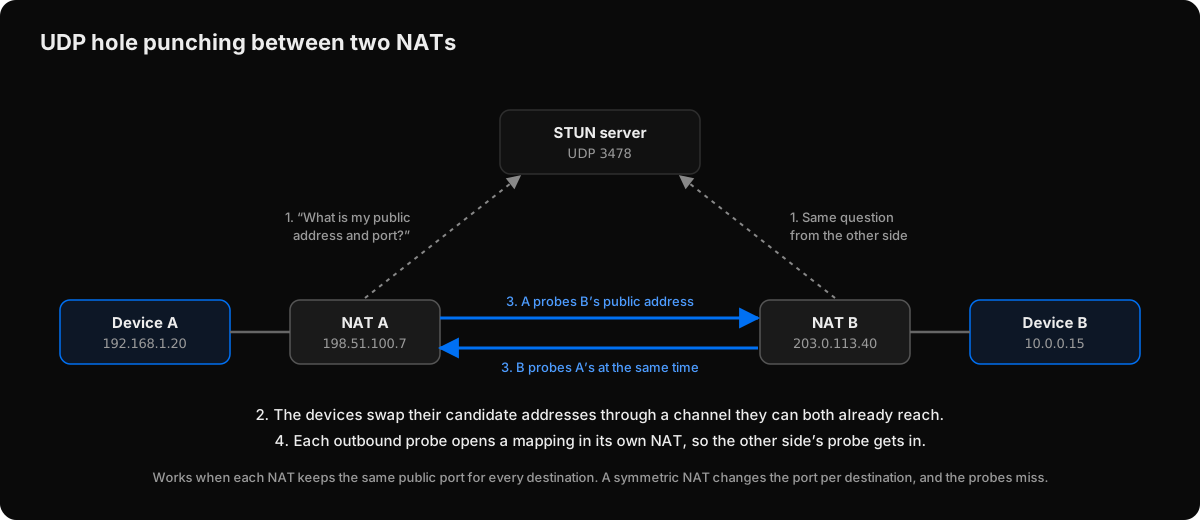 UDP hole punching: each outbound probe opens a mapping in its own NAT, which lets the other side's probe in.
Device A's probe toward B's public address creates a mapping in NAT A that allows replies from B. B does the same in the other direction. The first probes may be dropped by the far NAT because its mapping doesn't exist yet, but once both sides have sent, each NAT has a mapping that lets the other side's packets in. A probe gets answered, and the path is confirmed.
From then on, the devices send keep-alives often enough that the NAT mappings don't expire. Consumer routers commonly time out idle UDP mappings in tens of seconds to a few minutes.
Why hole punching sometimes fails
- Symmetric NAT. If one side's NAT picks a new public port for every destination, the port it learned from STUN isn't the port its peer will see. The probes go to the wrong port. Some mobile carriers and corporate firewalls behave this way. Techniques that guess ports exist, but they are unreliable.
- Outbound UDP blocked. Some networks only allow TCP, or only web traffic.
- Aggressive filtering or short timeouts. Firewalls that drop inbound UDP regardless of mappings, or expire them within seconds.
That is why every practical NAT traversal system has a fallback.
Relays: the fallback that always works
A relay is a server both devices can reach with ordinary outbound connections. Each device connects to it, and the relay forwards packets between them. TURN (RFC 8656) is the standard protocol for this in ICE and WebRTC; mesh VPNs often run their own relay protocol.
A relay adds a detour and therefore latency, but it doesn't depend on NAT behaviour at all. In a well-designed system the traffic through the relay is already end-to-end encrypted, so the relay is a route, not a party to the conversation. See how encrypted remote access works.
How Peerlify does it
Peerlify is a mesh VPN, and it follows the recipe above:
- Relay first. The first packets to a peer go through a Peerlify relay, so a connection works within moments. The encrypted session is set up over the relay too.
- Candidates. Each device offers, in order of preference: a global IPv6 address, LAN addresses, a public address mapped by the router through UPnP, NAT-PMP or PCP (the client asks for one automatically where the router allows it), and the public address seen by the relay's STUN service on UDP 3478. All direct traffic uses one local UDP port. Candidates are exchanged inside the encrypted session.
- Probing. Both devices probe each other's candidates every second, for the first 30 seconds and then for as long as traffic keeps flowing.
- Switch. Once a probe is answered, traffic moves to the direct path without dropping the session. The relay connection stays open as a fallback.
- Keep-alive. Keep-alives run every 5 seconds on the direct path. If they go unanswered for 20 seconds, traffic falls back to the relay and the search starts again with the next packet.
Where it stops: Peerlify doesn't currently traverse symmetric NATs, so a pair with one side behind one stays on the relay, as does any device on a network that blocks outbound UDP. Relays are reached over TCP on port 5879, 443 or 80, wrapped in TLS so firewalls treat the traffic like web traffic. A network that only allows traffic through an HTTP proxy can't carry Peerlify traffic.
You can see which path each peer uses:
peerlify list peers -sbuild-server.k3x9q2m7pa.peerlify.net (100.100.0.12) - p2p (198.51.100.23:41641)
prod-db.k3x9q2m7pa.peerlify.net (100.100.0.15) - ERPFServer (203.0.113.10:5879)p2p is direct; ERPFServer is relayed. peerlify ping <peer> --until-direct keeps pinging until the path turns direct, which is a quick way to check whether a pair of networks allows it. The full reference is in Direct and relayed connections and Troubleshoot connectivity.
Summary
- NAT blocks unsolicited inbound packets; that's what traversal has to work around.
- STUN tells a device its public address; hole punching uses simultaneous outbound probes to open mappings on both sides.
- It works through NATs with endpoint-independent mapping, and fails through symmetric NAT or where UDP is blocked.
- A relay always works, at the cost of latency. With end-to-end encryption, it only ever sees ciphertext.