CGNAT (carrier-grade NAT, also called large-scale NAT) is network address translation run by your internet provider. Instead of giving your router its own public IPv4 address, the provider gives it a private one and shares a pool of public addresses among many customers. Your traffic is translated twice: once by your router and once by the provider.
For browsing and streaming you won't notice. For anything that needs to accept incoming connections, like a home server, a security camera, a game server or remote access to a machine at a branch office, it's a wall.
Why providers use it
The world ran out of unallocated IPv4 addresses years ago. Providers that need to connect more customers than they have public addresses put them behind CGNAT. It's common on mobile networks and increasingly on fixed-line, fibre, fixed-wireless and satellite connections.
RFC 6598 reserved a dedicated range for the space between the customer's router and the provider's NAT: 100.64.0.0/10 (addresses 100.64.0.0 to 100.127.255.255). The requirements for CGNAT devices are in RFC 6888.
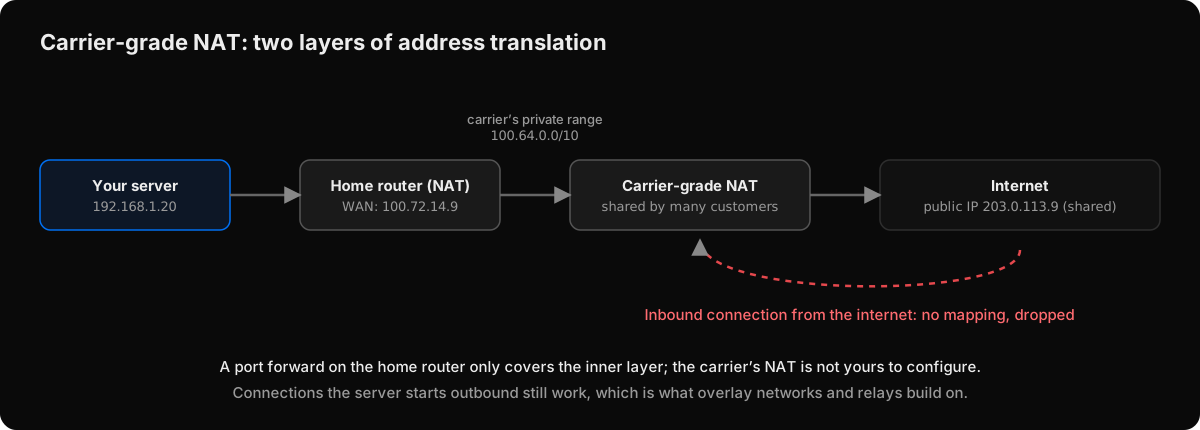 Behind CGNAT, the home router's WAN address is itself private. A port forward on your router only covers the inner layer.
How to tell if you're behind CGNAT
- Check your router's WAN (internet) address in its admin page.
- Compare it with your public address, as shown by any "what is my IP" service.
If the two differ, there's another NAT between your router and the internet. A WAN address in 100.64.0.0/10 is the clearest sign of CGNAT. A WAN address in a private range such as 10.x.x.x or 192.168.x.x usually means another router of yours, or the provider's, sits in front.
A traceroute to a public address that shows a 100.64.x.x–100.127.x.x hop right after your router points the same way.
Why port forwarding stops working
A port forward tells your router: "send inbound connections on port 22 to this machine". Behind CGNAT, inbound connections never reach your router. They arrive at the provider's NAT, which has no mapping for them and no way for you to add one. The public address you see is shared with other customers, so the provider can't hand you port 22 on it either.
Dynamic DNS doesn't help for the same reason: it points a name at the shared address, which still drops your inbound traffic.
What still works behind CGNAT
The important asymmetry: connections that start from inside still work. Your server can reach out to anything on the internet, and replies come back through the mappings that outbound traffic created. Every workaround builds on that.
- Ask the provider for a public IPv4 address. Some offer it, sometimes for a fee. Then you're back to ordinary NAT and port forwarding, with its usual exposure.
- Use IPv6. If both ends have working IPv6 and your router's firewall allows it, the server can have its own globally routable address. It still needs a firewall rule, and the client side needs IPv6 too.
- Use a reverse tunnel to a server you rent. The machine behind CGNAT keeps an outbound tunnel open to a VPS with a public address, and you connect through the VPS. It works, but the VPS is now a public entry point you have to maintain.
- Use a mesh VPN. Both ends connect outbound to a coordination service, then try to connect directly to each other with NAT traversal, and fall back to a relay when that's not possible. Nothing on either side listens on the internet.
Can two devices behind CGNAT connect directly?
Sometimes. Hole punching (explained in how NAT traversal works) works through CGNAT when the provider's NAT keeps a stable public port for each internal address and port, which RFC 4787 recommends and many CGNAT deployments do. When the NAT assigns a different port per destination (symmetric behaviour), the direct path fails, and a relay is the reliable answer.
Remote access behind CGNAT with Peerlify
Peerlify is a mesh VPN and every connection it makes starts outbound, so CGNAT on either side doesn't stop devices from joining the network or reaching each other:
- Install the client on the machine behind CGNAT and sign it in. For a headless server, use an auth key:
peerlify login --auth-key=<key>. - From your laptop, connect to the server's Peerlify address, such as
ssh admin@100.100.0.12. - The first packets go through a Peerlify relay. The two devices then try to punch a direct UDP path. If the provider's NAT allows it, traffic moves to the direct path; if it's symmetric, the connection stays on the relay. Both are end-to-end encrypted.
Run peerlify list peers -s to see which you got: p2p means direct, ERPFServer means relayed.
One more CGNAT-specific note: Peerlify's default network range, 100.100.0.0/16, sits inside the 100.64.0.0/10 block that CGNAT also uses. If your provider's internal addresses overlap with your Peerlify subnet, change the subnet under network settings.
For the step-by-step version, see how to access a server behind NAT.