A mesh VPN connects devices to each other directly, instead of routing everything through one central VPN server. Under the hood it has two separate jobs: a control plane that decides which devices belong to the network and distributes their keys and addresses, and a data plane of encrypted tunnels that run between the devices themselves.
This article walks through the architecture piece by piece. For what Peerlify specifically does, see the mesh VPN overview.
Start from hub and spoke
A classic remote-access VPN has a gateway (a concentrator, appliance or VM) with a public address. Clients open a tunnel to it, and the gateway routes their traffic into the network behind it.
That design is simple to reason about, but every packet takes the same detour. Two laptops in the same city talking to a server in a third location all pass through the gateway, wherever it is. The gateway is also a public listening service, a capacity bottleneck and a single failure domain.
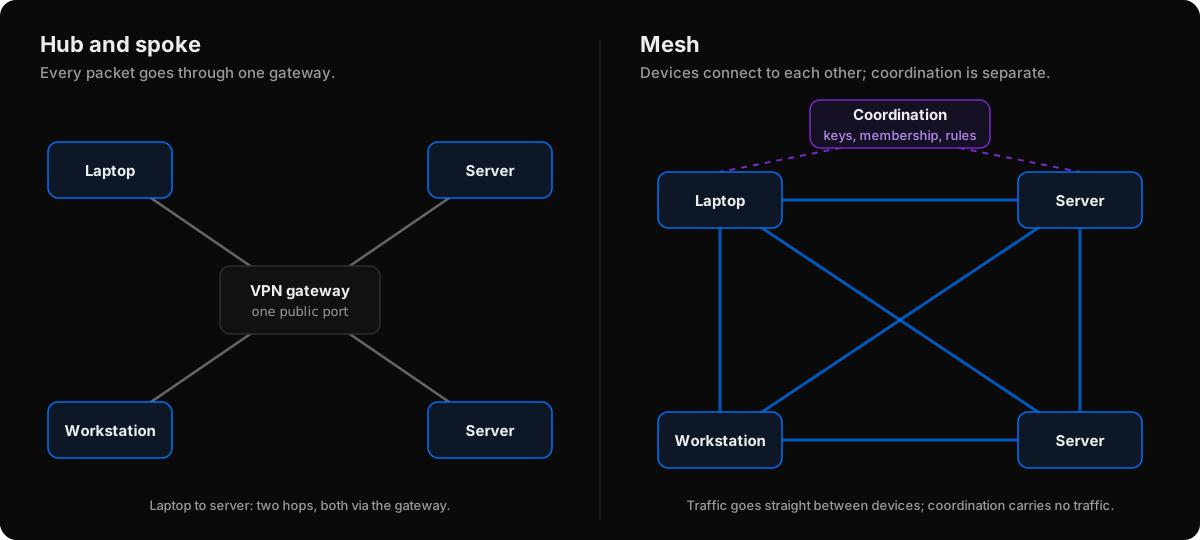 Hub and spoke versus mesh. In a mesh, the coordination service only coordinates.
A mesh VPN takes the gateway out of the data path. What remains of it becomes a coordination service.
The pieces of a mesh VPN
1. A client on every device
Each participating device, a node or peer, runs a client. The client creates a virtual network interface (a TUN device) and assigns it an address on the overlay network: a private address space that exists on top of whatever real networks the devices are on. Overlay addresses often come from the 100.64.0.0/10 shared address space (RFC 6598) because it rarely collides with home and office LANs.
When an application sends a packet to an overlay address, the operating system routes it into the virtual interface, and the client takes over.
2. Device identity
Each client generates a key pair on the device. The public key becomes the device's identity; the private key never leaves it. This is what lets a mesh authenticate devices rather than network locations.
3. The coordination service (control plane)
The coordination service is the part that replaced the gateway. It:
- signs devices in, usually by tying them to a user from an identity provider;
- assigns overlay addresses;
- tells each device which peers exist, with their public keys, overlay addresses and how to reach them;
- distributes access rules;
- pushes changes when devices join, leave or move.
It does not carry traffic. That's the key difference from a gateway: it's in the path of decisions, not packets.
4. Per-peer encrypted tunnels (data plane)
When device A first sends to device B, the clients perform a cryptographic handshake using their key pairs and derive session keys that only the two of them know. Every packet between them is then encrypted with those keys. Because each pair has its own session, compromising one device's traffic doesn't expose anyone else's.
5. NAT traversal
Most devices sit behind NAT and can't accept inbound connections. Mesh clients use NAT traversal: they learn their public address with STUN, exchange candidate addresses, and probe each other at the same time so each NAT opens a path for the other. How NAT traversal works covers this in depth.
6. Relays
When a direct path isn't possible (symmetric NAT, blocked UDP), traffic goes through a relay that both devices can reach outbound. Since packets are already encrypted end to end, the relay forwards ciphertext. It's a route, not a gateway.
Following one packet
Put together, a request from a laptop to a database server looks like this:
- The app connects to the server's overlay address, say
100.100.0.15:5432. - The OS routes the packet into the virtual interface.
- The client looks up which peer owns
100.100.0.15in the list it got from the coordination service. - If there's no session yet, it performs the handshake with that peer's public key.
- It encrypts the packet and sends it over the best path available: direct UDP if traversal succeeded, the relay otherwise.
- The server's client decrypts it, checks it came from a known peer and is allowed by the access rules, and hands it to the server's network stack.
The coordination service took no part in steps 1–6. If it's briefly unreachable, devices can keep using the peer list they already have.
What the architecture buys you, and what it costs
Benefits
- Shorter paths. Traffic takes the direct route when the network allows it.
- No public listener to defend. Devices connect outbound; there's no gateway port for scanners to find.
- Per-device access control. Rules can name devices, users and groups because every device has its own identity.
- No central bottleneck. Bandwidth scales with the devices, not with one box.
Costs
- A client everywhere. Every device that participates needs the software. A gateway can front machines that run nothing.
- Trust in the coordinator. Whoever runs the control plane decides which keys belong to the network. Understand that trust boundary for any mesh you deploy.
- NAT is not always beatable. Some pairs will always be relayed, with the latency that implies.
How Peerlify maps onto this
Peerlify follows this architecture with a few specifics worth knowing:
- The client runs as a service on Windows, macOS and Linux and assigns addresses from the network's subnet,
100.100.0.0/16by default. - Each device creates an Ed25519 key to identify itself to the control plane and a P-256 key for sessions with peers. Only public keys leave the device.
- The control plane streams each device a peer list (names, addresses, public keys, relays) and its access rules, signed, and updates it every few seconds.
- Sessions use a handshake modelled on the Noise IK pattern and AES-256-GCM for packets.
- Paths start on a relay and move to direct UDP once a probe gets through; relays are reached over TLS-wrapped TCP.
- Access rules are enforced by the receiving device.
The overlay carries IPv4, and Peerlify doesn't route to machines without the client (no subnet routing). The How Peerlify works doc has the full detail, and peer-to-peer VPNs explained looks at the "direct" part more closely.