Platform & IT teams

Reach private infrastructure without exposing it.

A build agent in a colo. A database on an office LAN. A lab machine behind CGNAT. Reach all of them from anywhere — without a port-forward, a jump host, or a VPN concentrator every packet has to detour through.

  • no inbound ports
  • works behind cgnat
  • aes-256-gcm, end to end
  • windows · linux · macos
A developer working on a laptop beside a compact home server and a sunlit window.

No attack surface

Nothing listens on the public internet.

Every enrolled machine runs the Peerlify service, and the service connects out. It signs in to the control plane, receives a signed list of its peers and rules, and negotiates paths to those peers. You never open a port for it — which removes most of the work that usually surrounds private access.
  • No firewall change on the target network, and no NAT rule to document
  • No bastion host in the blast radius, because there is no bastion
  • No public DNS record or certificate for the service you are reaching
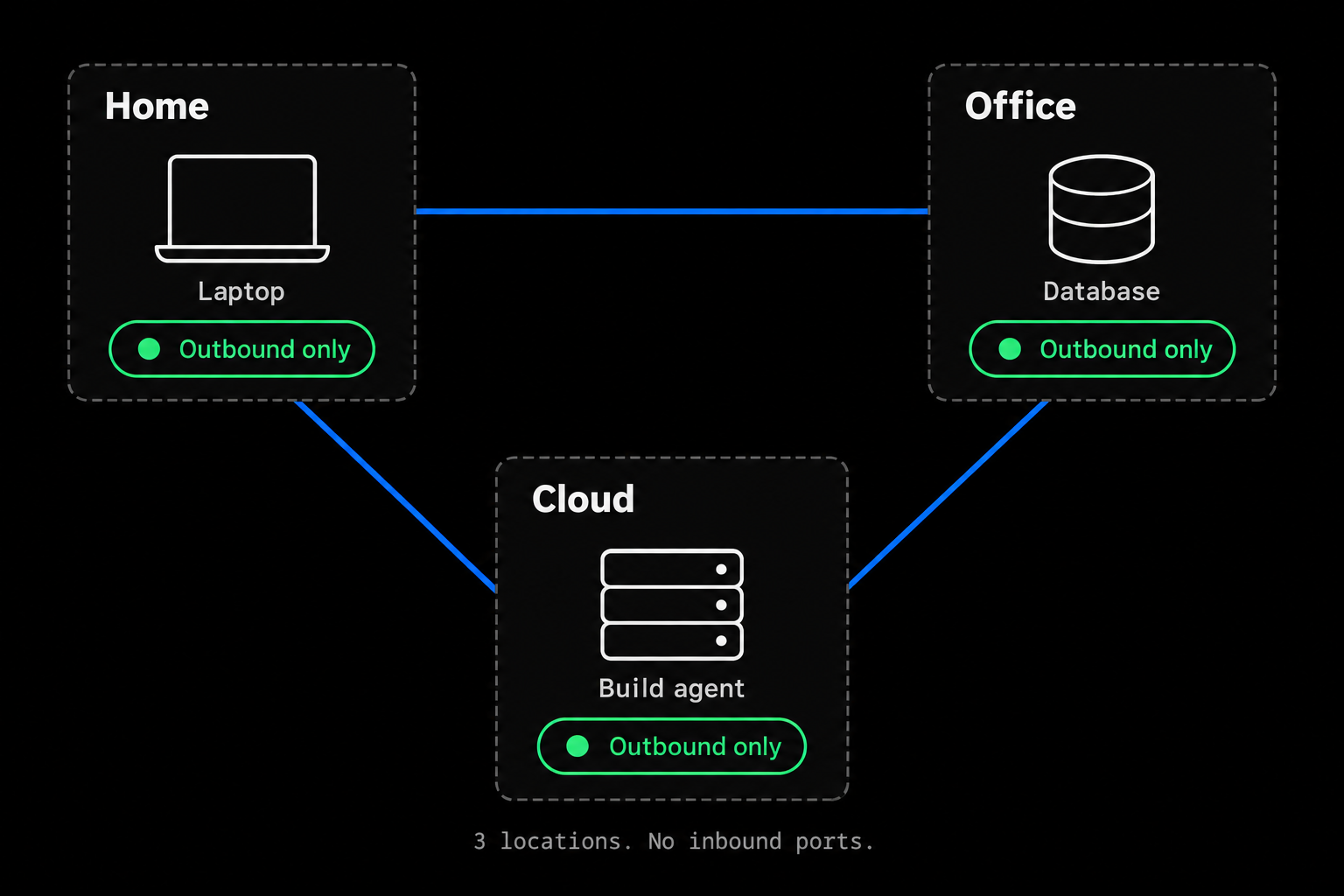
What a mesh VPN is
Diagram
A home laptop, office database, and cloud build agent connect directly in a triangle. Each location is marked Outbound only; there is no central gateway.
Three locations, one private mesh. Each device establishes its connections outbound.

Nothing listens on the public internet.

A home laptop, office database, and cloud build agent connect directly in a triangle. Each location is marked Outbound only; there is no central gateway.

Scroll to explore details. Press Escape to close.

Path selection

The shortest path that actually works.

A connection starts on a relay so it works straight away. Meanwhile the two devices exchange the addresses they might be reachable at and probe each other; once a probe is answered, traffic moves to the direct path without dropping the connection.
  • Candidates — LAN and IPv6 addresses, router port mappings (UPnP, NAT-PMP, PCP), and the public address seen by STUN
  • Hole punching — both sides probe at the same time so each NAT lets the other in
  • Relay — when no direct path works, traffic stays on TLS-wrapped TCP
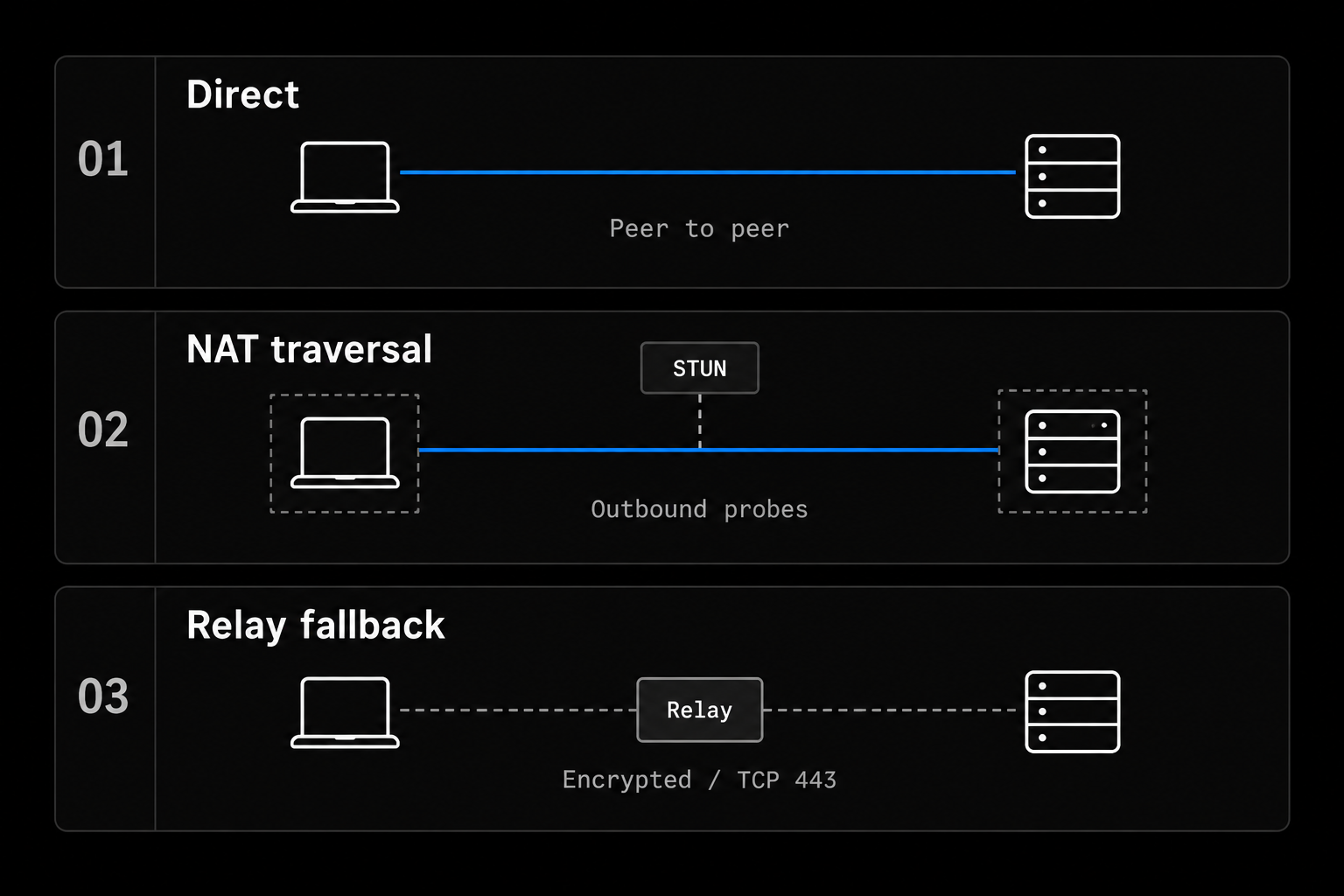
How NAT traversal works
Diagram
Path options between two peers: a direct connection, STUN-assisted hole punching, and an encrypted relay
Traffic uses a direct path when one can be validated, and an encrypted relay otherwise.

The shortest path that actually works.

Path options between two peers: a direct connection, STUN-assisted hole punching, and an encrypted relay

Scroll to explore details. Press Escape to close.

Authorization

Access follows identity, not network position.

Being on the network is not the same as being allowed to reach something. Reachability is decided by a policy written against users, groups, roles and tags, and enforced by the device that receives the connection.
  • Rules reference tags, groups and roles, not IP ranges you keep in sync by hand
  • Ports and protocols per rule; embedded tests run before every policy save
  • Members use the network but have no console access
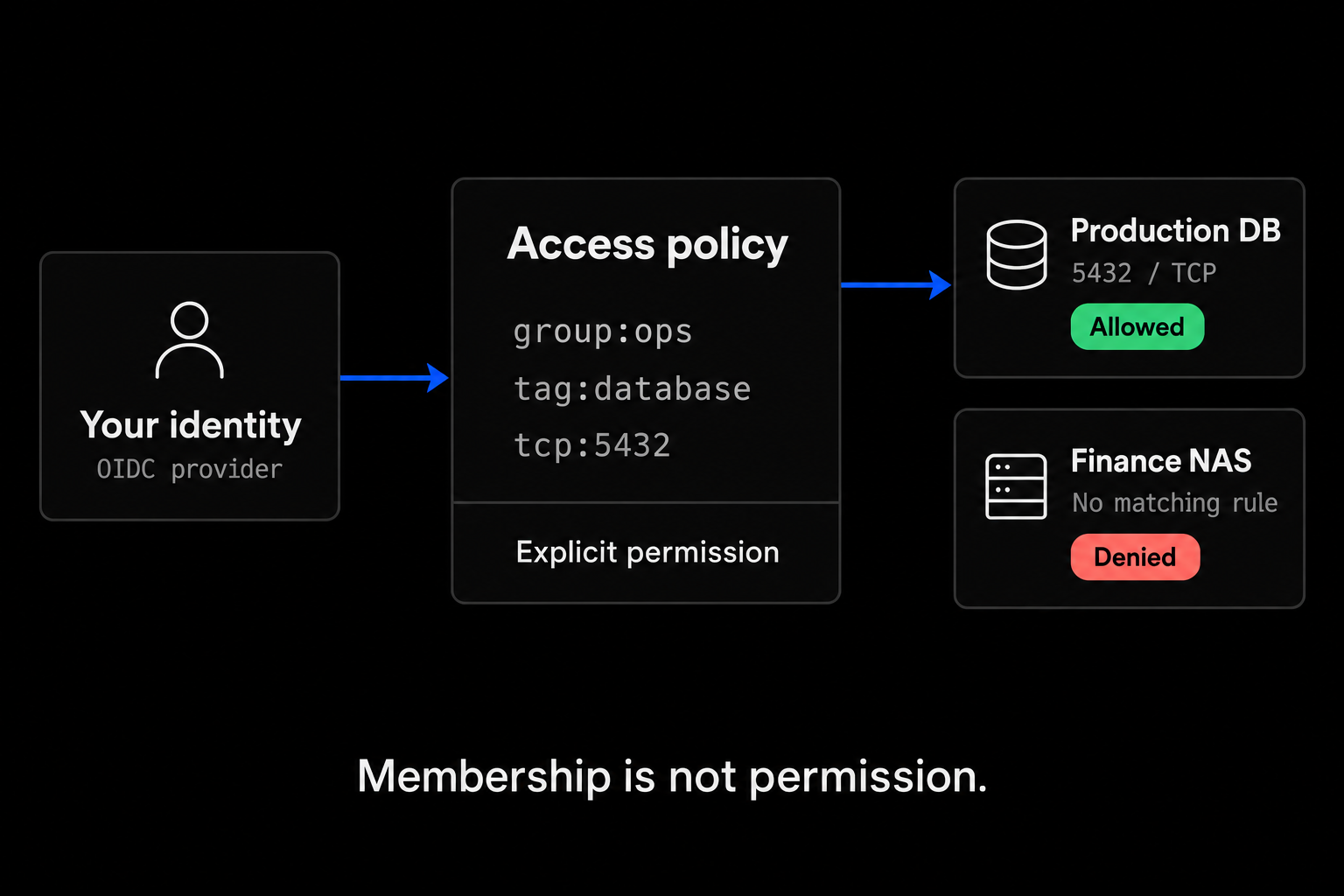
The access-control model
Diagram
An OIDC identity matches an access policy for group:ops to tag:database on TCP port 5432. The production database is allowed; Finance NAS has no matching rule and is denied.
Example policy: the ops group can reach the tagged database on TCP 5432. Once you replace the default allow-all rule, other resources need their own rule.

Access follows identity, not network position.

An OIDC identity matches an access policy for group:ops to tag:database on TCP port 5432. The production database is allowed; Finance NAS has no matching rule and is denied.

Scroll to explore details. Press Escape to close.

Encryption

Encrypted end to end — relay or not.

Every packet is sealed between the two endpoints. Keys come from a P-256 handshake modelled on the Noise IK pattern; packets use AES-256-GCM with a separate key per direction. The relay and the control plane are both in the picture, and neither holds a key that could open a packet.
  • Private keys live only on the device — the control plane never sees one
  • A relay forwards ciphertext; it cannot read or alter what passes through
  • A removed device drops out of its peers’ lists within seconds
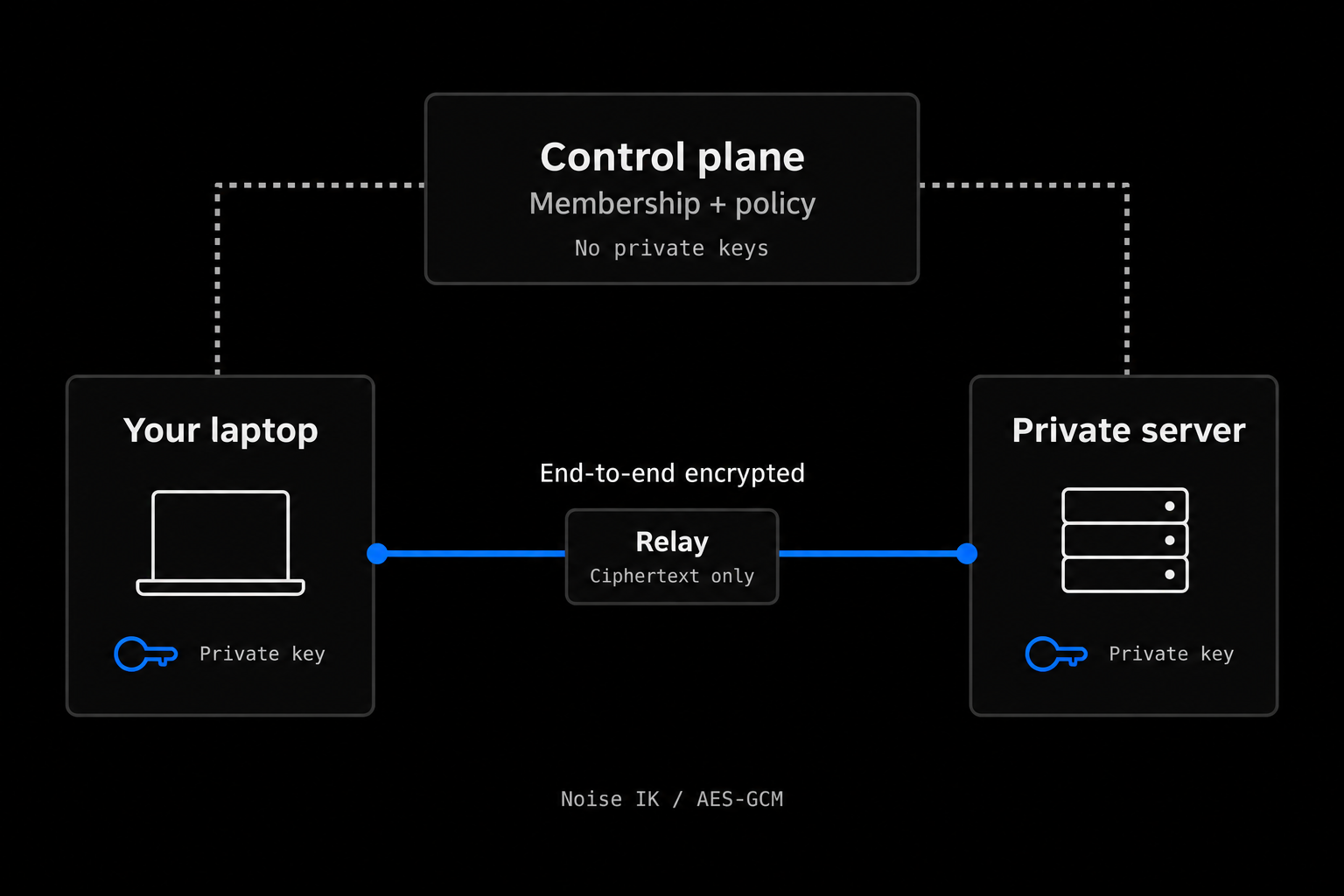
How we approach security
Diagram
A laptop and private server keep their own private keys. Their blue encrypted data path crosses a relay that sees ciphertext only. Separate dotted lines connect the endpoints to the control plane for membership and policy.
Keys exist only at the endpoints. Everything in between sees ciphertext.

Encrypted end to end — relay or not.

A laptop and private server keep their own private keys. Their blue encrypted data path crosses a relay that sees ciphertext only. Separate dotted lines connect the endpoints to the control plane for membership and policy.

Scroll to explore details. Press Escape to close.

What you get

The parts that matter in practice.

Not a feature list for its own sake — these are the properties that change how the work feels once it is running.

  • No inbound ports to open

    Every device makes outbound connections only. No port forwarding, no bastion, no public DNS record for the machine you are reaching.

  • Direct paths when possible

    Connections start on a relay while the two devices look for a direct UDP path, then move to it without dropping the session.

  • Identity-scoped rules

    Rules name users, groups, roles, tags and devices, down to protocol and port — not IP ranges you maintain by hand.

  • Chosen egress address

    Route a roaming laptop through an approved exit point so IP-allowlisted services see a stable address. Windows and Linux devices can act as exit points.

  • Works behind NAT and CGNAT

    Behind carrier-grade NAT, hotel Wi-Fi or mobile tethering, devices still connect: directly when hole punching succeeds, through a relay when it can’t.

  • Audit trail

    Administrative changes such as policy edits and device approvals are recorded in the audit log, and every policy version can be compared and restored.

Frequently asked

Questions we actually get.

Do I have to open a firewall port on the machine I want to reach?
No. The client on that machine only makes outbound connections: to the control plane, to a relay over TLS-wrapped TCP, and outbound UDP probes toward its peers. You don’t add a port-forward or a firewall rule. Its routers may still let return UDP traffic from a peer through as part of hole punching, which is how direct paths form.
Can Peerlify see my traffic?
No. Traffic is encrypted end to end between the two devices, with keys derived in a P-256 handshake modelled on the Noise IK pattern and AES-256-GCM for the packets. When two devices can’t reach each other directly, a relay forwards the ciphertext; it holds no key that could decrypt it. It does see metadata such as IP addresses and packet sizes.
What happens when a direct path is impossible?
Symmetric NATs — common on mobile carriers and some corporate networks — defeat hole punching, and so do networks that block outbound UDP. Those pairs stay on a relay, reached over TCP port 5879, 443 or 80 inside TLS so firewalls treat it like web traffic. Latency is higher; encryption is unchanged. See Direct and relayed connections for the full path negotiation.
Can I reach a whole subnet without installing the client on every host?
Not yet. Subnet routers — advertising a CIDR of non-Peerlify addresses from one enrolled device — are on the roadmap and are not in the current client on any platform. Today, a machine you want to reach needs the client installed on it. We would rather say that here than let you find out during a migration.
How do I remove someone’s access?
Remove the member, or their devices, in the Peerlify console. Online peers drop a removed device from their peer list within seconds, typically under ten. Removing someone from your identity provider alone does not end a device session that is already enrolled.

Pricing

Start free. Grow when you need to.

Every paid plan starts with a 14-day trial, and a trial never asks for a card.

  • Personal

    Free

    Your own private mesh, free forever.

  • Team

    Popular

    $6/user/mo

    Small teams sharing a private network.

  • Business

    $16/user/mo

    Growing organizations with operational needs.

  • Enterprise

    Custom

    Custom controls and procurement.

Compare every plan and limit

Enrol two machines and watch them find each other.

The free plan is a real network, not a demo. Run peerlify list peers to see whether each connection is direct or relayed on your own network.